|
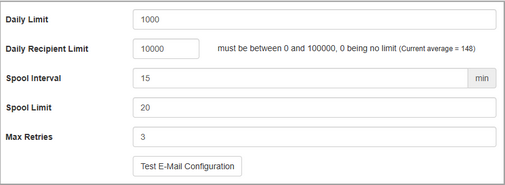
The Email Spool settings are used to configure the private email server so that the server processes and sends emails efficiently.
| 1. | On the Application Preferences page, click Email from the Components menu. |
| 2. | Enter the desired value (0–100,000) in the Daily Limit field. Note: The value entered in this field represents the maximum number (up to 100000) of emails that may be sent by the email server in a 24-hour period. |
| 3. | Enter the desired value (0 – 100,000) in the Daily Recipient Limit field. This field represents the SMTP daily recipient limit, which may vary by provider. For more information consult your SMTP provider. Note: When zero is entered, the option will be disabled. When values 1–100,000 are entered, the current daily average is monitored and displays in the (Current average =) field. |
| 4. | Enter the desired value (5–1440) in the Spool Interval field. Note: The value entered in this field represents how frequently (up to 1440 minutes) the email spool will be processed. The minimum value is every 5 minutes. |
| 5. | Enter the desired value (0–1000) in the Spool Limit field. Note: The value entered in this field represents the maximum number of emails that may be processed in a single spooling process. |
| 6. | Enter the desired value (0–3) in the Max Retries field. Note: The value entered in this field represents the maximum number (up to 3) of retries for sending an email. |
|


